Add your hotel and the comp set you price against
Every recipe that puts you against the market reads two things from your account: your hotel, and the hotels you compete with. The first one everybody does. The second is the one nobody gets told about, and it is why a rate report arrives looking suspiciously like your own price list. Ten minutes, once, and every other recipe starts answering properly.

What you'll build
A hotel registered on your account with its slug and its OTA profiles detected, up to ten competitors attached to it, and the free call that reads the set back — which is where the comparison recipes get the slugs they loop over.
How it works
- 01Why the comp set is not optional
- 02Add the hotel
- 03Read the profiles it found
- 04The slug is not the name
- 05Attach up to ten competitors
- 06Read the set back from the API
- 07What happens next
Step by step
By the end you will have a hotel on your account with its slug, its OTA profiles detected and its competitors attached — the setup every comparison endpoint in Veetal quietly assumes you already did.
What you need: a Veetal API key. Nothing else — the account endpoints are free and open to every key.
What it costs: nothing in the dashboard. Creating the hotel, resolving it against Booking and attaching competitors are all free. The comp set does change what an import costs later, and that part is worth reading before you launch one.
Why the comp set is not optional
Veetal's comparison endpoints do not take a list of rivals as a parameter. They read the set configured on the hotel. So the size of your comp set decides the shape of the answer:
- Rates come back as
{ report: { [slug]: [rate, ...] } }— your hotel and every competitor in the same payload. With an empty set, that object has one key: yours. - Reputation carries a
competitorsblock next to your hotel's, which arrives empty when the set is empty. - Reviews include the set by default (
include_competitorsistrue): its reviews come in the samereviewslist as yours, each tagged withaccommodation_slugandis_primary. With an empty set, every review is yours — a solo reading, not a benchmark. - The live rate grid is one call per property in the set. No set, no grid.
Parity is the exception: it compares what your own hotel costs on each channel, so it does not use the set at all.
This is also the part of Veetal that a plain scraping API does not have. The comp set is stored configuration, not a query parameter you rebuild on every call.
1. Add the hotel
On Accommodations, Add accommodations. The wizard opens on three routes:
- Search Booking accommodation — the usual one.
- I have accommodation Booking URL — for when the search is ambiguous and you already have the listing open.
- Import accommodations from .csv/.xls file — the bulk route, and the sane way to load a portfolio.
Search by name. Results carry the hotel photo and city, and they come tagged:
- It's yours — already one of your accommodations. Greyed out, which saves you the duplicate.
- Is competitor — when you are adding competitors, already one of this hotel's.
- Is existing — already on your account, as a competitor of another of your hotels. Adding it reuses that entity instead of creating a duplicate, which is why it resolves instantly.
If nothing matches, use fewer words: the search matches Booking approximately, not your exact string.
2. Read the profiles it found
Pick one and Continue. Veetal resolves the listing for real and shows you what it found — stars, guest score, review count, address — plus Profiles Found: the OTAs this hotel actually has a listing on.
That block is a forecast. An OTA with no profile has nothing to import, and the reputation feed will only return the ones with a green tick. Repeat search profiles runs the detection again if you think it missed one, and View Profile opens the matched listing so you can confirm it is the right property before it lands on your account.
Once added, the row's SETUP column keeps showing that profile map, one badge per OTA.
3. The slug is not the name
The slug Veetal assigns comes from the Booking URL, not from the display name. "Ohla Barcelona" became ohla.
Every endpoint takes the slug, so copy it from the row instead of guessing it from the hotel's name. Half the "the endpoint returns nothing" tickets are a slug someone typed from memory.
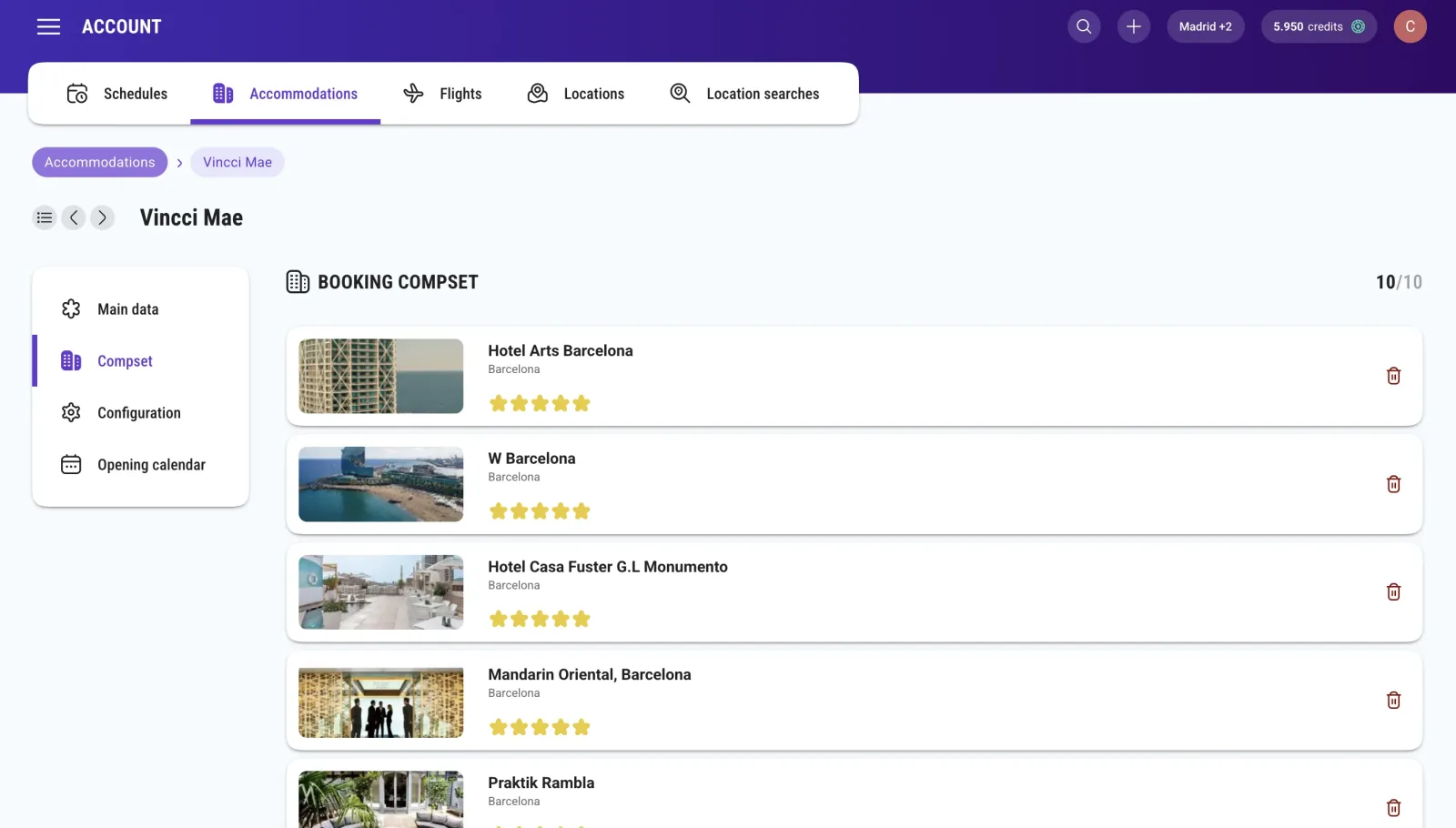
4. Attach up to ten competitors
Open the hotel from the list and add competitors from its detail, with the same finder you used for the hotel — which is why search results already know how to tell you a property Is competitor.
Two things decide whether this step is useful:
Who belongs in the set. A guest choosing your hotel is not choosing between every hotel in the city. They are choosing between the handful in your district, in your band, for their dates. A comp set of ten hotels that a guest genuinely compares beats a comp set of ten hotels that share your star rating and nothing else.
What each one costs. The cap is ten, and it is a cap for a reason: every competitor multiplies the cost of the rates, reputation and reviews imports — a hotel with 5 competitors counts as 6. Reputation and reviews also count each OTA, so 5 competitors across 3 OTAs is 18 listings per run, not 3. Rates are Booking only, and parity reads your hotel alone. The dashboard shows the credit estimate before you launch an import — read it there, not in the invoice.
5. Read the set back from the API
GET /v3/account/accommodation/{accommodation_id}/competitors
Free, like the rest of the Account API. {accommodation_id} is your hotel's internal id, not its slug: GET /v3/account/accommodation lists your hotels keyed by slug, with the id inside each entry.
The answer is an array, one object per competitor: id, name, location and otas, with the Booking slug under otas.booking.slug and the identifiers of every other OTA it was found on. You rarely need those slugs for the feeds: rates and reputation are read with your hotel's slug and bring the set in the same answer. Where they matter is a live rate grid, which loops over the set — one call to get it, then one rate call per property.
To add competitors, POST to the same path with a booking_urls array; DELETE on …/competitors/{competitor_id} takes one out:
curl -X POST "https://api.veetal.app/v3/account/accommodation/YOUR_ACCOMMODATION_ID/competitors" \
  -H "veetal-api-key: YOUR_API_KEY" \
  -H "Content-Type: application/json" \
  -d '{ "booking_urls": ["https://www.booking.com/hotel/es/YOUR_COMPETITOR.html"] }'
What happens next
The hotel and its set are configuration, not data: on their own they fetch nothing. From here the path forks — a Real Time endpoint answers about them immediately, one request at a time, and a Feed dataset needs an import to have run first.
Two more things worth knowing about the list: every row has activate, deactivate and delete, and the checkboxes give you the same three in bulk. A deactivated entity stops being imported, and what earlier imports wrote stays readable until it ages out (rates, parity, reputation, location search and flight data are kept 15 days; reviews, events and market demand are not deleted). That is the right move for a hotel you stopped managing, and much better than deleting it.
Questions
How many competitors can I add?
Ten per hotel, counting the ones already attached. The cap is deliberate: each competitor multiplies the cost of the rates, reputation and reviews imports, and a set of thirty hotels is not a comp set — it is the city.
Do competitors consume credits on their own?
No. Creating them and resolving them against Booking is free. What they change is the size of every later job: a rates import covers the hotel plus its set on Booking, a reputation or reviews import covers them on every OTA with a profile, and a live rate grid is one call per property. Over the API, finding a competitor's profiles on the other OTAs is a call of its own, and that one is billed (see the next question).
My rate report only contains my own hotel. What is wrong?
The comp set is empty. The rates payload is keyed by slug and includes every competitor configured on the hotel, so with no set it comes back with a single key — yours.
Can I build the comp set over the API?
Yes. The whole set has endpoints: GET and POST on /v3/account/accommodation/{accommodation_id}/competitors, and DELETE on /v3/account/accommodation/{accommodation_id}/competitors/{competitor_id}. The POST takes a booking_urls array of Booking.com hotel URLs and resolves each one for you. It adds to the set rather than replacing it, and the ten-hotel cap counts the competitors already there: going over it answers error 730. The request is in step 5 above. Three things to know. It wants the internal id, not the slug — the one /account/accommodation returns inside each entry, while the slug is the key. It only takes Booking URLs: to turn a name into one, GET /v3/real-time/booking/search/hotel/{name} searches Booking, and that is a billed Real Time request. And a competitor added this way is resolved on Booking only: its profiles on the other OTAs come from POST /v3/account/accommodation/{competitor_id}/otas, billed by the OTAs it fills. That is the honest split — the dashboard finder is better for putting a set together, the API is better for keeping it in sync with your own system.
The search marks a hotel as Is existing. What does that mean?
That it is already on your account, as a competitor of another of your hotels. Adding it again reuses that entity instead of creating a duplicate, which is why it resolves instantly. It only looks at your own account: nothing another customer tracks shows up here, and they see nothing of yours.
Should I delete a hotel I stopped managing?
Deactivate it. A deactivated entity stops being imported — so it stops costing credits — and what earlier imports wrote stays readable until it ages out (rates, parity, reputation, location search and flight data are kept 15 days; reviews, events and market demand are not deleted).
Build your own
Start free with 1,000 API credits. No credit card, no sales call.
What do you want to build with competitors?
Say it in one line and we hand you back the prompt, the recipe if one already exists, and the APIs it runs on — starting with competitors.
