Import a hotel's reputation from Booking
Reputation is scattered across the OTAs where a hotel is listed, each with its own scale and its own category breakdown. Set the hotel up once in Veetal, run the import, and then read every OTA from a single endpoint — with a small CLI that turns it into a report you can share.
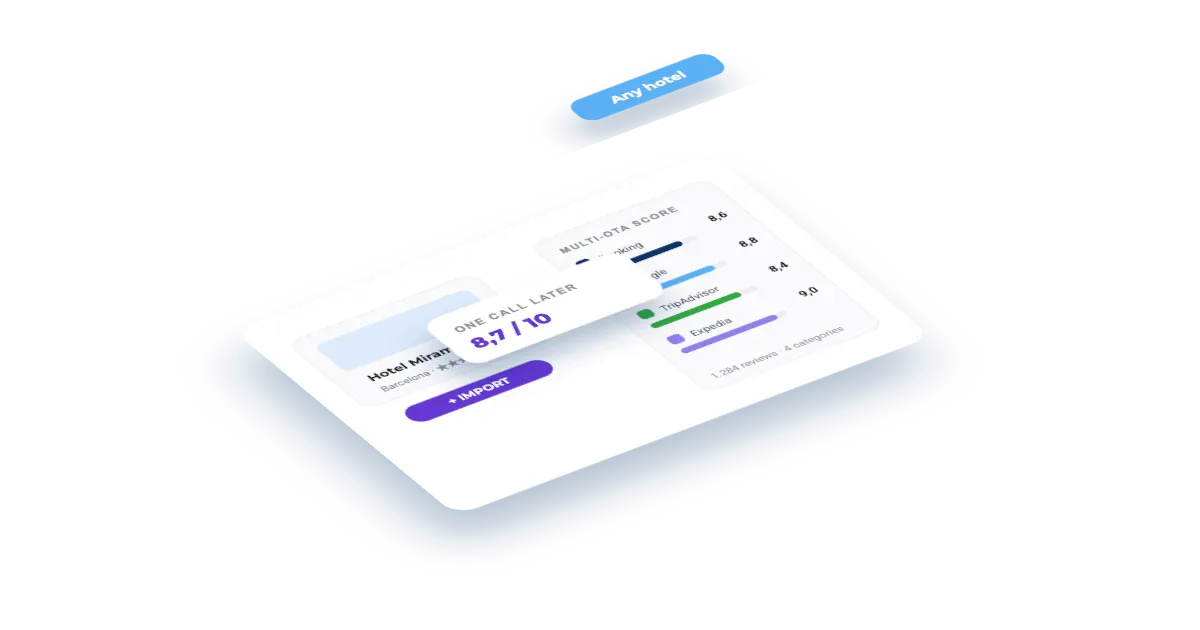
What you'll build
A hotel registered in Veetal with its reputation imported from every OTA where it has a listing, plus a command-line tool that reads the feed and prints a comparison table — score, review count and category breakdown per OTA — and writes it out as CSV and HTML so you can drop it into a report.
Set this up first
RequiredThe endpoints don't take free text — they take your identifiers. This recipe assumes the things below already exist on your account; while one of them is missing, the call answers with an error or with less than you expect. Each point links to the recipe that walks it.
- 01
Register the hotel in your dashboard
Veetal resolves the property against Booking.com and assigns it a slug — and that slug, not the hotel name, is what every accommodation endpoint takes.
Guide: Add your hotel and the comp set you price against →
The same thing over the API, if you would rather not click:
curl -X POST "https://api.veetal.app/v3/account/accommodation" \
  -H "veetal-api-key: YOUR_API_KEY" \
  -H "Content-Type: application/json" \
-d '{ ... }' # see the account reference for the bodyHow it works
- 01Add the hotel
- 02Check which OTAs it has
- 03Launch the import
- 04Follow the import
- 05Read the data
- 06If something goes wrong
- 07What's next
Step by step
By the end you will have a hotel registered in Veetal and its reputation imported from every OTA where it has a listing, ready to read over the API.
What you need: the Feed · Reputation API installed and active on your account, and the hotel's name as it appears on Booking.
What it costs: billing is per listing. One unit = one hotel on one OTA. The example in this recipe is 20 credits.
1. Add the hotel
In Accommodations click Add accommodations. The wizard offers three routes: search Booking by name (the usual one), paste the listing URL, or upload a file for a bulk import.
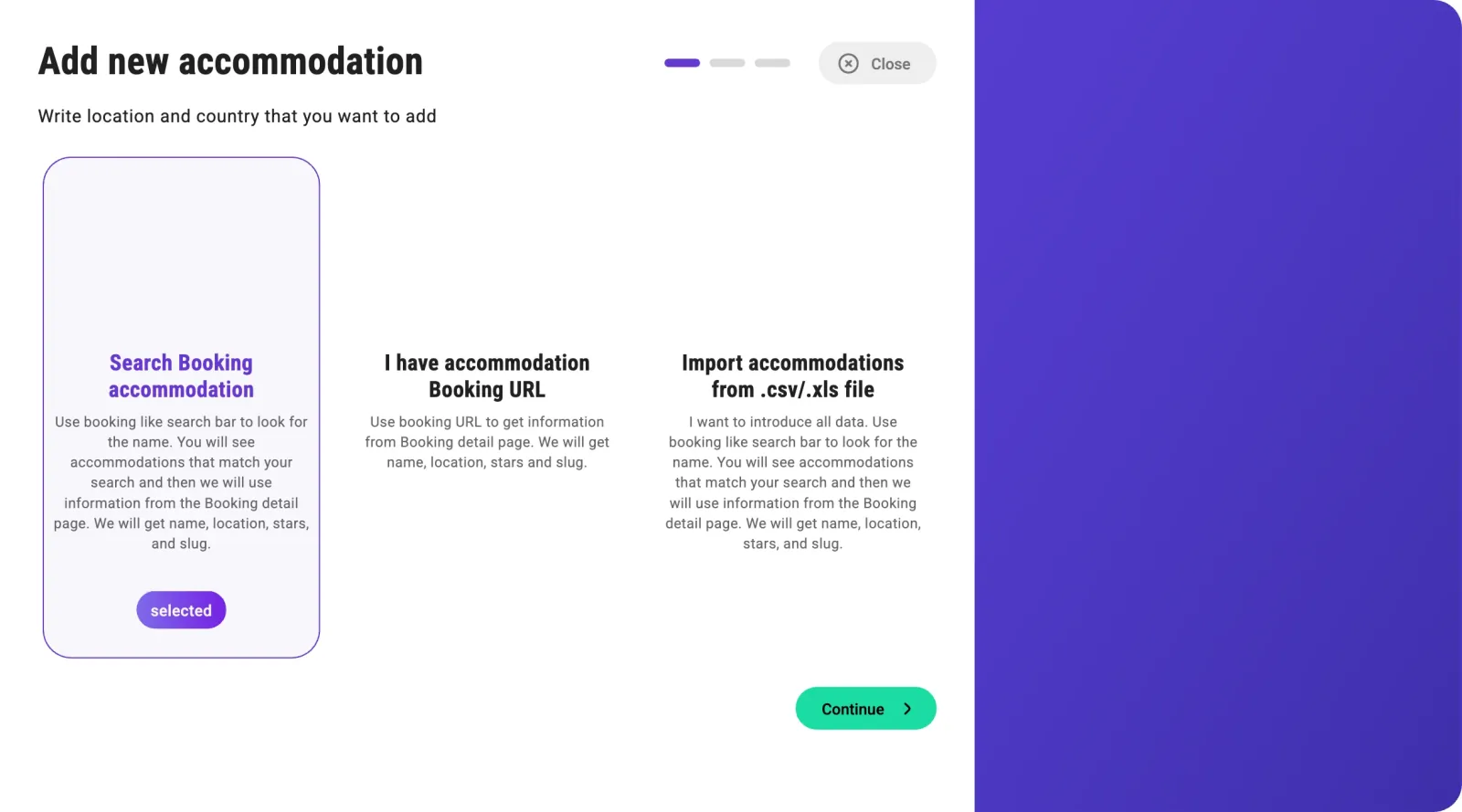
Search for the hotel and pick its listing. If nothing shows up, try fewer words: the search matches Booking approximately, not the full name you have in mind.
Some results come tagged: Its yours (already one of yours), Is competitor (already a competitor of one of your hotels) and Is existing (the listing is already in Veetal's database but not yours — it gets reused instead of creating a new one).
2. Check which OTAs it has
On continue, Veetal reads the Booking listing and shows what it found — category, score, review count and address — and below it, Profiles Found.
That row is the important part: you can only import reputation from the OTAs where the hotel has a profile. In the example there are three (Booking.com, Tripadvisor and Google); Expedia and Hotels.com have no listing. If one you expected is missing, try Repeat search profiles before continuing.
Click Add accommodation. The hotel shows up in the list with a SETUP column that colours in the OTAs with a profile.
3. Launch the import
Go to Reputation → Accommodations. Every row has its actions: ✈️ Request data takes you to try the endpoint, 🚀 Launch new import runs an import right now, the eye activates or deactivates it, and the copy icon gives you the slug the API identifies the hotel by.
Click the rocket on your hotel:
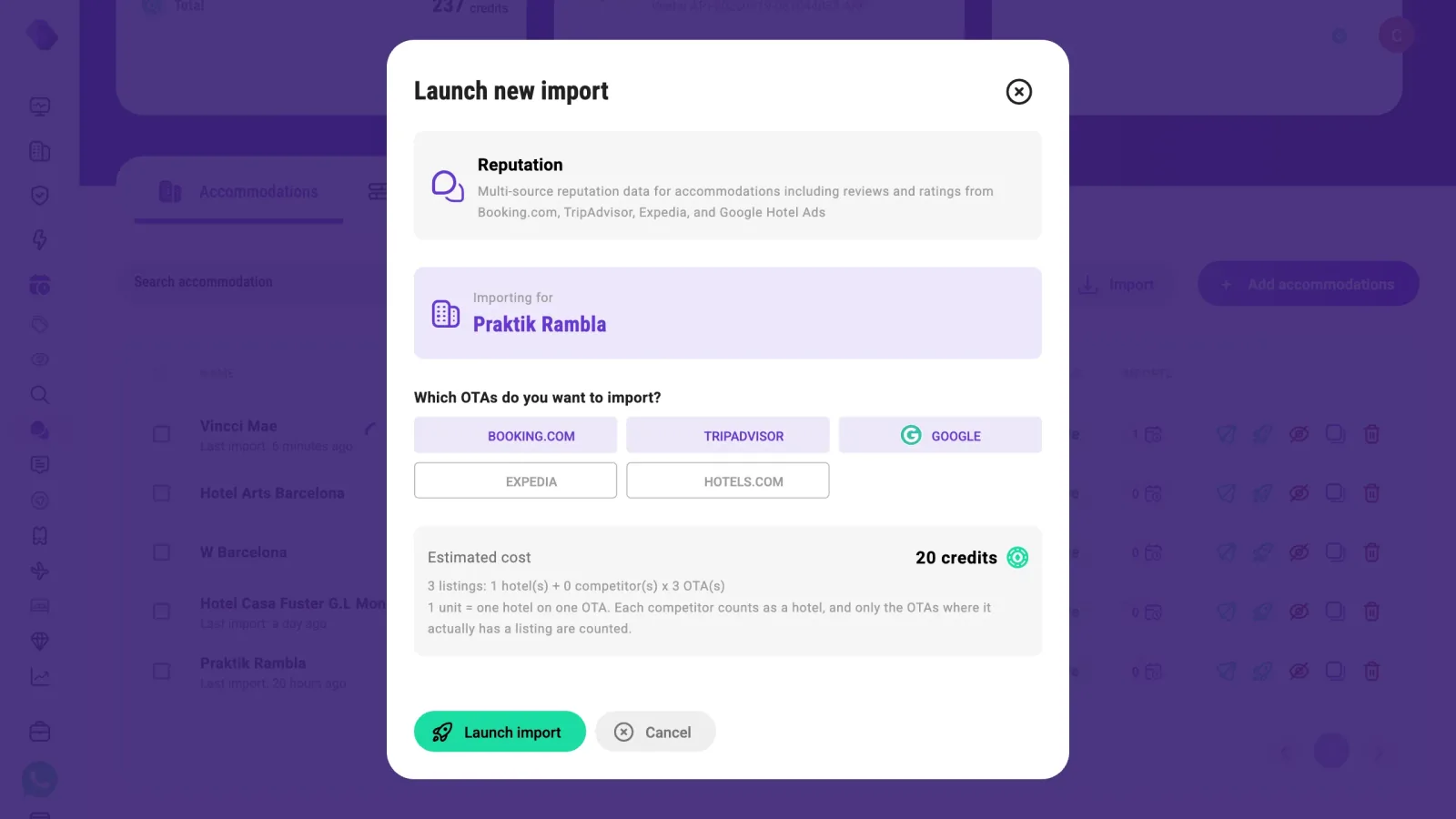
The selectable OTAs are exactly the ones where the hotel has a profile. Below you get the estimate:
3 listings: 1 hotel + 0 competitors × 3 OTAs → 20 credits.
Cost grows with the number of OTAs and with your comp set: a hotel with 5 competitors across 3 OTAs is 18 listings, not 3. Click Launch import.
4. Follow the import
In Imports your run appears with an identifier like Veetal-MANUAL-20260301-093015214-ARP — the MANUAL means you launched it, not a schedule.
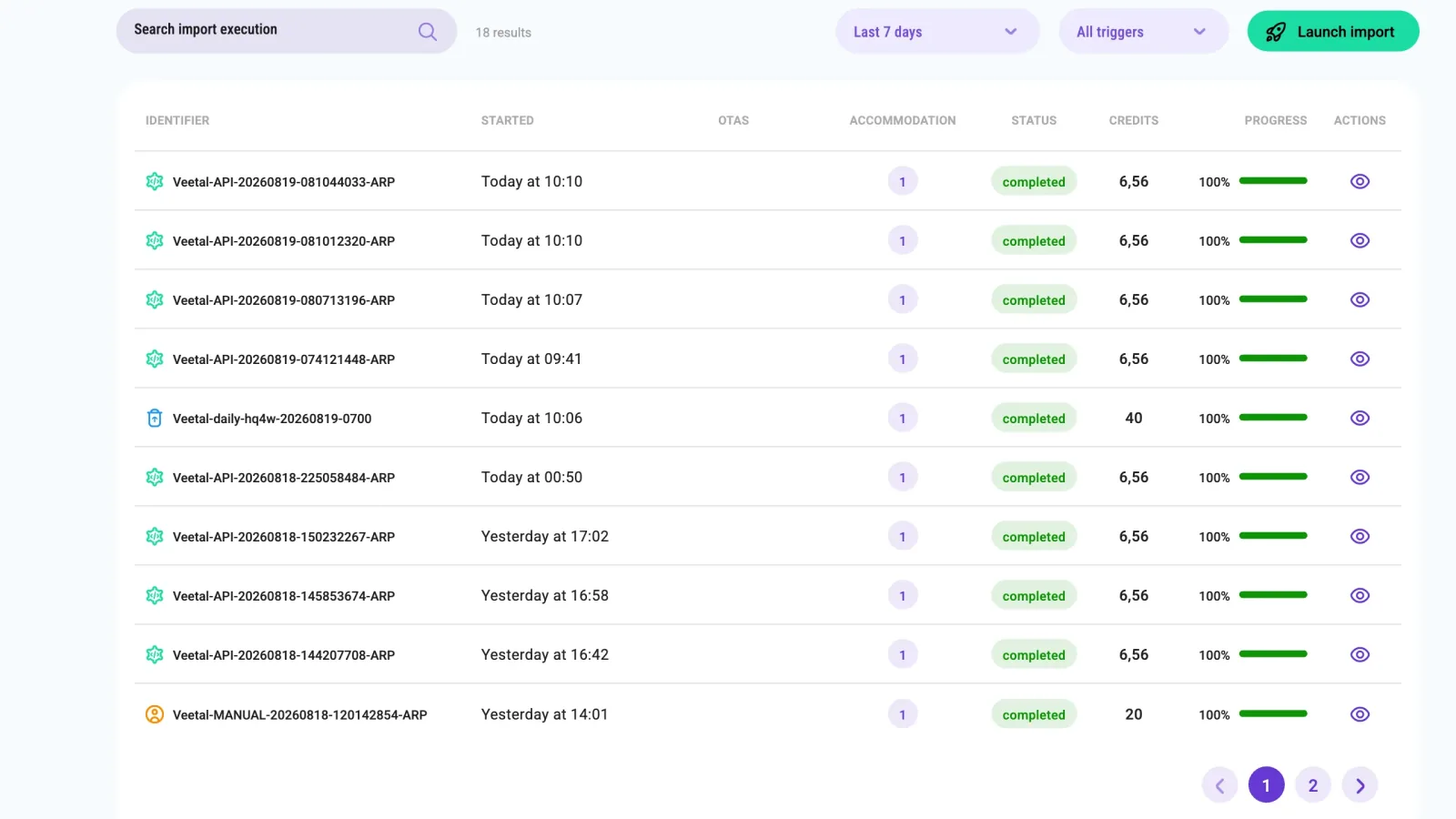
It takes a couple of minutes. Credits show as - while it runs and fill in when it finishes. The status can sit at running with progress already at 100% for a few seconds: it is closing the run, don't relaunch it.
5. Read the data
Back in Accommodations, click the ✈️ on your hotel: you land on Requests with the endpoint and the slug already filled in. Click Run request.
GET /v3/feed/accommodation/{accommodation_slug}/reputation
A response for a hotel on three OTAs looks like this (example figures):
| OTA | Score | Reviews | Breakdown |
|---|---|---|---|
| Booking | 8.6 | 1842 | 7 categories (location 9.7, staff 9.3, wifi 9.1, comfort 8.8, cleanliness 8.7, facilities 8.4, value 8.2) |
| 9.1 | 1215 | no breakdown | |
| Tripadvisor | 8.9 | 2406 | 6 categories (location 9.62, cleanliness 9.2, service 9.05, sleep quality 8.81, value 8.47, rooms 8.39) |
The response also carries a competitors block (empty if you have no comp set) and an import block with the identifier and date of the run the data comes from — so you always know which moment the score belongs to.
If something goes wrong
| What you see | What it means | What to do |
|---|---|---|
No accommodations found | Booking doesn't match that text | Search with fewer words |
| Only one or two OTAs selectable | The hotel has no profile on the rest | That's normal; check the OTA configuration in the accommodation detail |
| The rocket is disabled | The accommodation is inactive on this API | Activate it with the eye icon |
Import in failed | The run couldn't complete | Open it to see the error and retry |
The endpoint answers 404 | No reputation is stored for the hotel: no import finished in the last 15 days, or the last one read no OTA | Launch a new import, and schedule it so the data does not expire |
The endpoint answers 400 | The slug is not on your account | Copy it again from the dashboard |
What's next
- Schedule it from the Schedules tab: daily, weekly or monthly. The estimator tells you the monthly cost before you save.
- Add competitors in the accommodation detail, up to 10. Each one multiplies the cost of every import.
- If what you want is the data right now with no prior import, use the real-time endpoints per OTA.
Clone and run
RunnableThe whole recipe is one self-contained folder: Node 20, no build step, and a test suite that runs without a key.
git clone https://github.com/Veetal-Connect/recipes.git
cd recipes/import-hotel-reputation
cp .env.example .env          # put your VEETAL_API_KEY in it
node --env-file=.env index.mjs --list
node --env-file=.env index.mjs YOUR_ACCOMMODATION_SLUGCheck your key first
One call, five seconds. If this answers, the recipe will run.
curl "https://api.veetal.app/v3/feed/accommodation/YOUR_ACCOMMODATION_SLUG/reputation" \
  -H "veetal-api-key: YOUR_API_KEY"
Questions
Why do I need an import before reading anything?
Reputation is a Feed dataset: Veetal writes it to your account on a run, and the endpoint reads what that run left. Until the first import finishes there is nothing to read. That is also why it is fast — you are reading stored data, not scraping on request.
Which OTAs will I get?
Only the ones where the hotel actually has a listing. Veetal detects the profiles when you add the accommodation and shows them as Profiles Found; the import dialog then lets you pick among exactly those. Booking.com, Tripadvisor and Google are the usual three. If one you picked does not come back, the import could not read it that time — the recipe tells you which.
How is it billed?
Per listing: one hotel on one OTA is one unit. Three OTAs on one hotel is three listings. Competitors multiply it — a hotel with 5 competitors across 3 OTAs is 18 listings per run, not 3.
Can I get the score without setting up an import?
Yes, with the real-time reputation endpoints, which fetch from the OTA on request. They cost more per call and take longer, so they fit a one-off lookup rather than a dashboard you refresh.
Does the response tell me how old the data is?
It carries an import block with the identifier and date of the run the numbers come from, so every score is tied to a moment in time rather than floating.
The endpoint answers 404 or 400 — what is wrong?
A 404 means the hotel is on your account but no reputation is stored for it: no import has finished in the last 15 days — older ones are deleted — or the last one could not read any OTA. Launch a new import, and put it on a schedule so the data does not expire. A 400 means the slug is not on your account: copy it again from the dashboard.
Build your own
Start free with 1,000 API credits. No credit card, no sales call.
What do you want to build with rating?
Say it in one line and we hand you back the prompt, the recipe if one already exists, and the APIs it runs on — starting with rating.
