Put a reputation panel on your own website
The API returns scores, counts, category scores and text. It does not return sentiment, and it does not return "cleanliness is trending up". This recipe builds both — and the two guards that stop a five-review sample from growing a confident arrow.

What you'll build
A reputation panel in a shadow root: a headline score weighted across every OTA, a sentiment bar, category cards that only show a trend when the sample supports one, and the reviews with the hotel's replies — in light and dark, in Spanish and English.
Set this up first
RequiredThe endpoints don't take free text — they take your identifiers. This recipe assumes the things below already exist on your account; while one of them is missing, the call answers with an error or with less than you expect. Each point links to the recipe that walks it.
- 01
Register the hotel in your dashboard
Veetal resolves the property against Booking.com and assigns it a slug — and that slug, not the hotel name, is what every accommodation endpoint takes.
Guide: Add your hotel and the comp set you price against → - 02
Run one import on the hotel
A Feed dataset only contains what an import has written. Activate this API on the hotel, launch the first run by hand and read the credit estimate before you press — the cost grows with the comp set and, on multi-OTA datasets, with the OTAs too.
Guide: Import a hotel's reputation from Booking →
The same thing over the API, if you would rather not click:
curl -X POST "https://api.veetal.app/v3/account/accommodation" \
  -H "veetal-api-key: YOUR_API_KEY" \
  -H "Content-Type: application/json" \
  -d '{ ... }'   # see the account reference for the body
To see whether an import has already finished, list them:
curl "https://api.veetal.app/v3/account/imports" \
  -H "veetal-api-key: YOUR_API_KEY"
Feed reads are not billed per request. The credits go on the imports that collect the data, which is why the estimate appears before you launch and not after.
How it works
- 01Get the hotel ready
- 02Ask for every OTA at once
- 03What the API gives you, and what you have to compute
- 04The proxy
- 05The panel
- 06Embed it
- 07If something goes wrong
- 08What's next
Step by step
By the end you will have a reputation panel on your own website: one score built from every OTA your hotel is listed on, the sentiment split behind it, which categories are moving, and the reviews themselves — all behind a proxy that keeps your API key private.
What you need: the Feed · Reputation and Feed · Reviews APIs active, the hotel added, and one finished import of each.
What it costs: nothing per page view. Feed reads are not billed per request — the credits go on the imports that collect the data.
1. Get the hotel ready
Add the hotel in Accommodations and look at Profiles Found: whichever OTAs are detected there are the ones this widget can merge. A hotel with Booking, Google and Tripadvisor gives a far better panel than one with Google alone, and it costs the same to read.
Then go to Reputation → Accommodations and launch an import with every OTA you want in the average selected — not just one. Do the same in Reviews → Accommodations: the review list, the sentiment and the trends come from that second import, not from the first. Put both on a schedule; with a daily run the widget always shows reviews less than 24 hours old. The copy icon next to the hotel gives you the slug the API identifies it by.
2. Ask for every OTA at once
The mistake worth avoiding early: provider is optional on both reputation and reviews. Filter by it and you get one OTA. Omit it and you get all of them, in a single call — accommodation comes back as a list with one entry per OTA.
GET /v3/feed/accommodation/{slug}/reputation
GET /v3/feed/accommodation/{slug}/reviews?include_competitors=false&limit=200
Two things about that second line:
include_competitorsdefaults totrue. Forget it and your own website starts showing your competitors' reviews.limitmaxes out at 200. Ask for 500 and you get400with code226. Two 28-day windows fit comfortably inside the 200 most recent reviews.
Run it in the Playground before writing any code. On a real hotel the reputation call answered three sources at once:
[
  { "provider": "booking",     "review_score": 8.5, "review_count": 2468 },
  { "provider": "google",      "review_score": 9.0, "review_count": 1691 },
  { "provider": "tripadvisor", "review_score": 8.8, "review_count": 437 }
]
3. What the API gives you, and what you have to compute
This is the part that decides whether the panel is worth building. The API returns scores, counts, per-category scores and text. It does not return a sentiment field, and it does not return "cleanliness is trending up 12%".
So the widget derives four things, and keeps every threshold in one file (insights.mjs) so the choices are visible instead of buried:
| Derived | How | Threshold |
|---|---|---|
| Headline score | Average of every OTA, weighted by review count | — |
| Sentiment | Buckets over the 0-10 score | positive ≥ 9 · neutral 7-8.9 · negative < 7 |
| Category score | Mean per category over the trailing window | 28 days |
| Category trend | Change against the previous 28 days | ≥ 8 samples each side, ≥ 1 % movement |
Weight the headline. On the hotel above, the plain average of 8.5, 9.0 and 8.8 is 8.77. Weighted by review count it is 8.71 — Booking has 2,468 reviews and deserves to pull harder than Tripadvisor's 437. An unweighted average lets an OTA with nine reviews shout as loudly as one with two thousand.
Guard the trends, or they will lie to you. Both thresholds in that table came from real data, and both were added after watching the widget say something false:
cleanlinesshad 5 scores in the current window against 2 in the previous one. That is enough arithmetic to print "−4 %", and not remotely enough to mean it. One guest had a bad morning.locationhad a healthy 47 against 23 samples and moved −0.3 %. Rounded, the card rendered a solemn "↓0 %" — an arrow pointing at nothing, which a hotelier reads as a problem where there is none.
A category that fails either guard still shows its score. It just does not grow an arrow.
Merging is what makes the categories worth having. The names arrive already normalised — location means the same thing whether it came from Google or Tripadvisor — but each OTA exposes a different subset. Tripadvisor returns cleanliness, value_for_money and sleep_quality; Google returns service, location and rooms. Merged, you get seven categories where a single-OTA widget gets three.
4. The proxy
The Connect API accepts cross-origin requests — it returns access-control-allow-origin: * — so your page could call it straight from the browser. Do not. The request carries your veetal-api-key, and anyone who opens devtools walks away with it and can read your whole account.
The API key never leaves your server. The widget talks to your domain; your domain talks to Veetal.
export async function build() {
  const [reputation, reviews] = await Promise.all([
    // No provider filter: one entry per OTA, which is what turns this from a
    // Google widget into a reputation widget.
    veetalOptional(`/feed/accommodation/${SLUG}/reputation`),
    veetal(`/feed/accommodation/${SLUG}/reviews?include_competitors=false&limit=200`),
  ]);

  const own = (reputation && reputation.accommodation) || [];
  const all = reviews.reviews || [];

  const sources = own.map((entry) => ({
    provider: entry.provider,
    score: entry.review_score ?? null,
    count: entry.review_count ?? null,
  }));

  return {
    name: (own[0] && own[0].accommodation_name) || null,
    window_days: WINDOW_DAYS,
    headline: headline(sources),   // weighted across OTAs
    sources,
    sentiment: sentiment(all),     // every scored review, text or not
    categories: categories(all).slice(0, 6),
    reviews: all
      .filter((r) => reviewText(r))  // Booking splits it in two; some carry no text at all
      .slice(0, 12)
      .map(toCard),
  };
}
Note which population feeds what: sentiment and trends use every scored review, including the ones with no text. The visible list uses the opposite. Same payload, two different questions.
The endpoint on top caches for fifteen minutes and, when a refresh fails, serves the last good payload — a page that worked a minute ago should not go blank because an API call did.
5. The panel
The widget renders in a Shadow DOM, so the host page cannot bleed into it and it cannot bleed out. Everything is built with textContent, never innerHTML: these are texts written by strangers being rendered onto a commercial website.
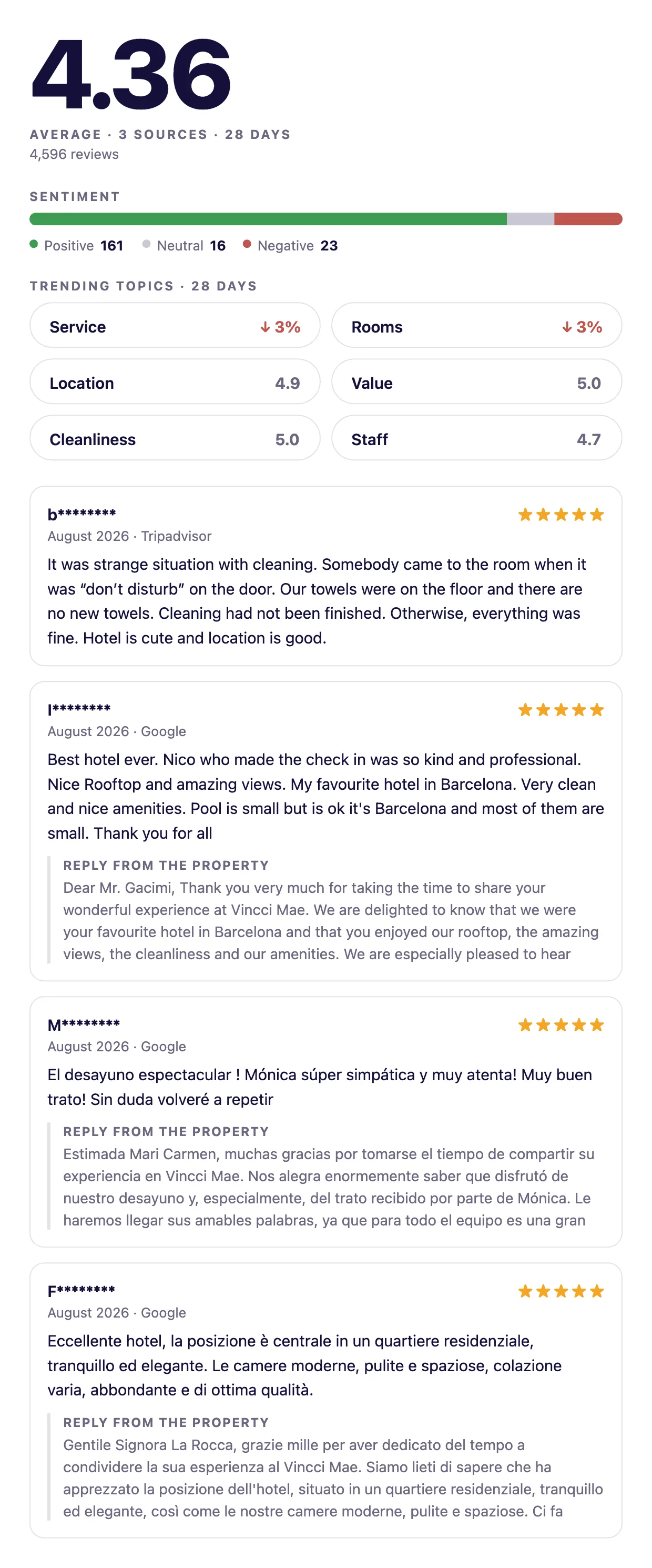
The score gets the room it deserves, the meta line says what it is made of — the average and how many sources — and the sentiment bar is a single stacked rule rather than a chart library. Below it, the categories: two with a real movement, four showing their score because their sample was too thin to compare. Service ↓3 % and Rooms ↓3 % are the only two claims the data actually supports, and those are the two a revenue manager should act on.
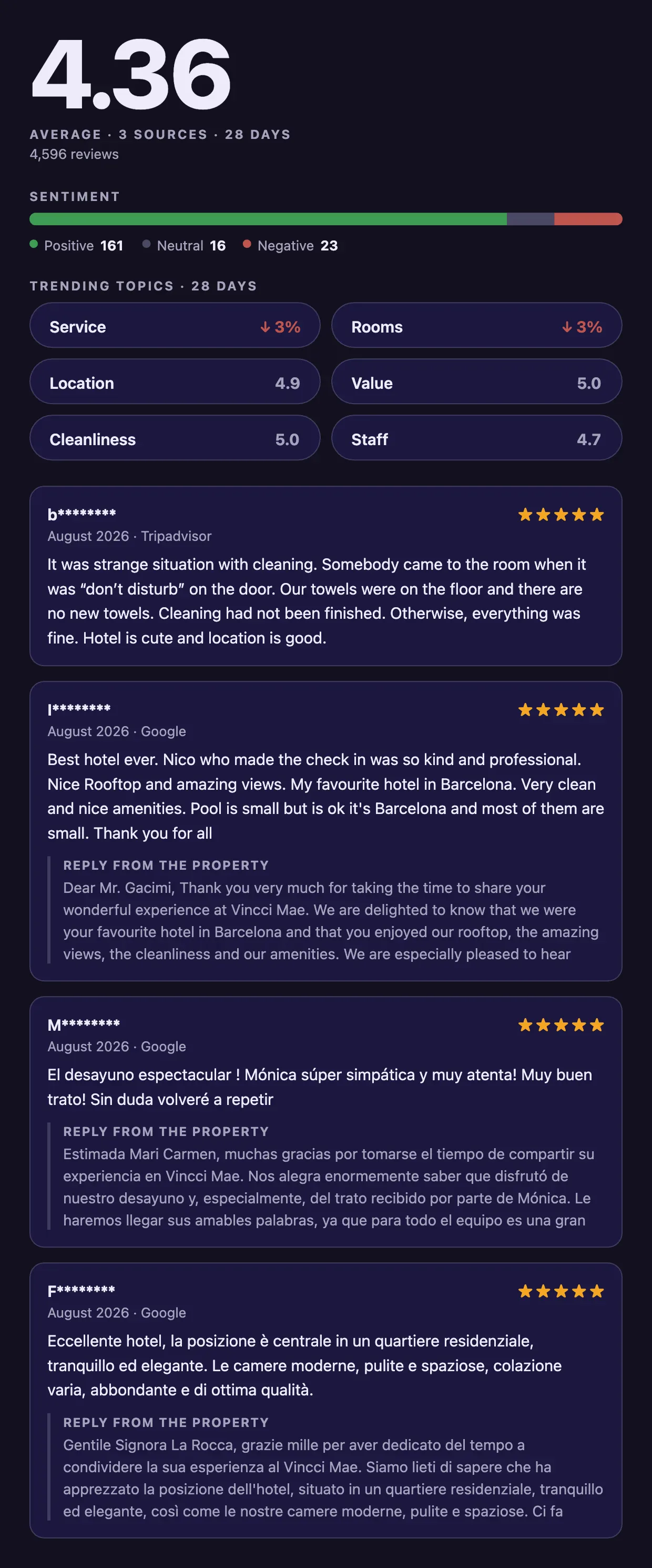
It follows the system colour scheme, and keeps following it if the visitor switches while the page is open:
6. Embed it
<div id="reviews"></div>

<script src="/veetal-reviews-widget.js"
        data-endpoint="/reviews-widget.json"
        data-target="#reviews"
        data-limit="5"
        data-locale="en"
        data-panel="full"
        data-theme="auto"></script>
data-panel decides how much shows: full is score + sentiment + topics + reviews, summary is the panel alone (good for a sidebar), list is the reviews alone. data-locale picks the label language — es or en — and formats the numbers, so the score reads 4,36 in Spanish and 4.36 in English.
If something goes wrong
| What you see | What it means | What to do |
|---|---|---|
400 with code 226 | limit above 200 | Ask for 200 and page with ?page=2 if you need more |
NoReviewsDataFound (785) | No reviews stored for that hotel | Launch an import in Reviews → Accommodations: the Reputation import does not bring reviews |
NoReputationDataFound (784) | The latest import brought no reputation | Expected after a reviews-only run. The panel degrades instead of dying |
| One source only | provider left in the request | Drop it — unfiltered means every OTA |
| Competitors' reviews on your page | include_competitors left at its default | Set it to false |
| Every category showing an arrow | Guards removed | Put them back. Small samples produce confident nonsense |
What's next
- Add
schema.org/AggregateRatingso the merged score shows up in Google's own results. - Track the headline over time by calling
/reputationwithimport_dateand drawing a sparkline next to it. - Split the sentiment bar by OTA — the same hotel is often read very differently on Booking and on Tripadvisor, and that gap is itself a finding.
Clone and run
RunnableThe whole recipe is one self-contained folder: Node 20, no build step, and a test suite that runs without a key.
git clone https://github.com/Veetal-Connect/recipes.git
cd recipes/google-reviews-widget
cp .env.example .env          # put your VEETAL_API_KEY and slug in it
npm install
node --env-file=.env server.mjs # http://localhost:8787Check your key first
One call, five seconds. If this answers, the recipe will run.
# every OTA the hotel is listed on, one entry each
curl "https://api.veetal.app/v3/feed/accommodation/YOUR_ACCOMMODATION_SLUG/reputation" \
  -H "veetal-api-key: YOUR_API_KEY"

# the reviews: no provider means every OTA, and limit tops out at 200
curl "https://api.veetal.app/v3/feed/accommodation/YOUR_ACCOMMODATION_SLUG/reviews?include_competitors=false&limit=200" \
  -H "veetal-api-key: YOUR_API_KEY"
Questions
Does the API return a sentiment score?
No. It returns reviews and reputation: scores, counts, per-category scores and text. Sentiment is derived in the widget by bucketing the 0-10 score — positive from 9, negative below 7 — and those thresholds are a product decision, not a Veetal number. They live in one file so you can change them.
Why is my headline score lower than the average of my OTAs?
Because it is weighted by review count. On a real hotel the plain average of 8.5, 9.0 and 8.8 was 8.77, and the weighted one 8.71: Booking had 2,468 reviews against Tripadvisor's 437, so it pulls harder. An unweighted average lets a nearly empty OTA shout as loudly as a busy one.
Why do some categories show a percentage and others just a number?
Because a percentage needs enough evidence. A category only gets an arrow when both 28-day windows hold at least eight scores and the movement is at least 1%. Below that it shows its score alone. Real case: cleanliness compared 5 reviews against 2, which is enough arithmetic to print "-4%" and nowhere near enough to mean it.
How do I get more than one OTA in the panel?
Leave provider out of the request. It is optional on both reputation and reviews, and unfiltered means every OTA the last import covered — accommodation comes back as a list with one entry each. Then make sure your import actually selected those OTAs in the dashboard.
The reviews call answers 400 with code 226
limit is capped at 200. Ask for 200 and paginate with ?page=2 if you need more history. Two 28-day windows fit inside the 200 most recent reviews for a hotel with normal traffic.
Can I show only the panel, without the review list?
Yes: data-panel="summary" renders the score, the sentiment bar and the categories with no list, which fits a sidebar. data-panel="list" does the opposite. The default, full, shows everything.
Why are the reviews old, or the trends panel empty?
Reviews come from their own import, in Reviews → Accommodations, not from the Reputation one. They pile up run after run, but only refresh when that import runs: once the newest review is older than 28 days, the trends panel has nothing left to compare. Put the Reviews import on a schedule.
Build your own
Start free with 1,000 API credits. No credit card, no sales call.
What do you want to build with reviews?
Say it in one line and we hand you back the prompt, the recipe if one already exists, and the APIs it runs on — starting with reviews.
